5 Virtual Staging Mistakes That Kill Real Estate Listings (And How to Avoid Them)
Virtual staging should make your listings sell faster. But done wrong, it actively hurts them — confusing buyers, triggering MLS violations, and wasting credits on unusable images.
After staging hundreds of properties as a licensed agent, I've seen the same mistakes over and over. Here are the five that kill listings, and exactly how to avoid each one.
Mistake #1: Staging Over Clutter Instead of Clearing First
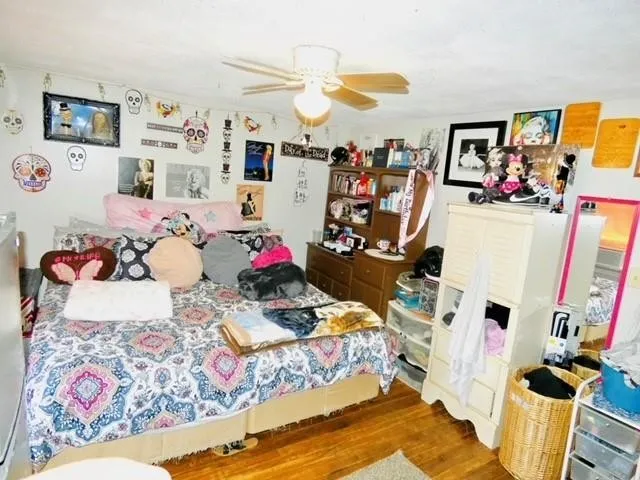
The mistake: Uploading a photo of an occupied, cluttered room and expecting AI to magically stage it.
Why it fails: AI staging tools work by overlaying furniture onto a room. If the room is already full of the seller's belongings — toys on the floor, furniture against walls, clutter on counters — the AI either:
- Stages on top of the existing items (furniture floating over clutter)
- Removes some items but leaves others (partially cleared room looks worse than the original)
- Produces artifacts where old and new furniture overlap
What happens to your listing: Buyers see obviously fake photos. Instead of imagining themselves in the space, they're distracted by the bad editing. Trust is lost before the showing.
The fix: Use a two-step approach:
- Clear the room first — use a furniture removal tool to digitally empty the space
- Review the cleared result — make sure built-ins, flooring, and architecture look clean
- Then stage the empty room with fresh furniture
This costs 2 credits instead of 1, but the result is dramatically better. For heavily cluttered rooms, consider using a room redesign tool instead — it swaps all furnishings rather than trying to remove and re-add.
When to skip staging entirely: If the room is so cluttered that even digital clearing doesn't produce a clean result, ask the seller to physically clear the space for photos. Some rooms just need to be clean before any staging — digital or physical — will work.
Mistake #2: Choosing the Wrong Design Style for the Market
The mistake: Staging a $180K starter home with luxury modern furniture, or staging a $2M waterfront with budget minimalist pieces.
Why it fails: Buyers subconsciously evaluate whether they can afford a home based on how it's staged. Luxury staging on an affordable home makes buyers think "that's not for me." Budget staging on a luxury home makes it look cheap.
What happens to your listing: Mismatched staging repels your target buyer demographic. The home gets views but fewer showings because the staging sends the wrong price signal.
The fix: Match the staging style to the price point and market:
| Price Range | Best Styles | Avoid | |---|---|---| | Under $250K | Clean, simple, neutral | Luxury modern, ornate | | $250K–$500K | Transitional, modern, farmhouse | Ultra-minimal, ultra-luxury | | $500K–$1M | Contemporary, mid-century modern | Budget furniture, basic | | Over $1M | Luxury modern, designer, curated | Generic, mass-market looks |
Pro tip: Use the Instructions field when staging. Instead of just selecting "Modern," add context: "Clean modern appropriate for a young family, warm tones, practical furniture." The AI uses these instructions to calibrate the result.
Mistake #3: Forgetting AI Disclosure
The mistake: Uploading AI-staged photos to MLS without any disclosure or labeling.
Why it fails: This isn't just bad practice — it's a compliance violation. NAR Code of Ethics Article 12 requires truthful representation. Most MLSs explicitly require virtually staged photos to be labeled.
What happens to your listing:
- MLS compliance violation ($500–$5,000 fine)
- Photos removed from listing during critical market time
- Potential ethics complaint through your local board
- Buyer trust issues if staging is discovered during showing
- In worst cases, legal liability if buyer feels misled about property condition
The fix:
- Label every AI-staged photo — use your platform's disclosure tools or add a text overlay
- Add disclosure to your listing description: "Select photos have been virtually staged to illustrate the space's potential."
- Keep original photos — upload at least one un-staged version of each staged room
- Know your MLS rules — check the specific requirements for your MLS (they vary)
This takes 30 seconds per listing and protects you from hours of compliance headaches.
Mistake #4: Bad Source Photos
The mistake: Uploading dark, blurry, wide-angle distorted, or portrait-orientation photos and expecting great staging results.
Why it fails: AI staging tools are only as good as the input photo. The AI needs to understand room geometry, lighting, and perspective to place furniture convincingly.
What bad input produces:
- Dark photos: AI adds furniture but can't match the lighting, creating obvious compositing
- Wide-angle/fisheye: Furniture appears distorted, especially near frame edges
- Portrait orientation: Most tools are optimized for landscape; portrait crops result in awkward staging
- Blurry photos: AI can't determine room boundaries, producing furniture that clips through walls
The fix — The 6 rules for staging-ready photos:
- Shoot in landscape orientation — always horizontal, never vertical
- Shoot from the corner — capture two walls and the floor for maximum room context
- Open the blinds — natural light helps AI understand the space
- Hold the camera at chest height — not overhead, not floor level
- Use a standard lens — avoid extreme wide-angle (no GoPro or ultrawide phone lens)
- Keep the shot steady — use a tripod or brace against a doorframe
One well-lit, properly composed photo will produce better staging results than five quick phone shots from bad angles.
Mistake #5: Over-Staging (Making It Look Too Perfect)
The mistake: Staging every room to look like a magazine cover with perfectly arranged accessories, plants on every surface, and art above every piece of furniture.
Why it fails: Ironically, perfection triggers suspicion. When every room looks like a catalog photo, buyers know it's fake. The uncanny valley of real estate staging — too perfect to be believed.
What happens to your listing: Buyers arrive at the showing with unrealistic expectations set by magazine-perfect staging. The real (empty) property disappoints by comparison. This is the opposite of what staging should do.
The fix: Stage for possibility, not perfection.
- Keep it simple: A sofa, coffee table, and area rug in a living room. That's enough. You don't need 15 throw pillows, a stack of books, candles, and a plant collection.
- Leave some breathing room: Not every wall needs art. Not every surface needs accessories.
- Focus on the hero rooms: Stage the living room, master bedroom, and kitchen. Skip the guest bathroom, laundry room, and second guest bedroom.
- Match the listing price point: More modest staging for starter homes, more polished staging for luxury listings.
The goal of staging isn't to make the home look perfect — it's to help buyers see themselves living there. An overstaged room doesn't invite imagination; it overwhelms it.
The Common Thread
All five mistakes share a root cause: treating virtual staging as a shortcut instead of a tool.
Staging is a marketing tool that works when used thoughtfully:
- Start with good photos
- Choose appropriate styles for the market
- Clear cluttered rooms before staging
- Disclose AI-altered images
- Stage for possibility, not perfection
The agents who get the best results from virtual staging are the ones who treat each photo as a marketing decision, not a checkbox.
Ready to stage smarter? Try our photo tools free — 5 credits, no credit card. Stage a room, redesign a space, or preview a kitchen remodel. And use the instructions field — it makes all the difference.
Frequently Asked Questions
How many rooms should I virtually stage? Focus on 3–5 key rooms: living room, master bedroom, kitchen, dining room, and one bathroom. Staging every room is unnecessary and can trigger the "too perfect" reaction.
Should I stage an occupied home? Yes, but use a two-step process: digitally clear the room first, review the result, then stage. One-step staging over existing furniture produces inconsistent results.
What's the best photo resolution for virtual staging? Most AI tools work best with images between 2000–4000 pixels wide. Avoid uploading extremely high-resolution images (8K+) as they slow processing without improving results. Keep files under 10MB.
How do I know if my staging looks realistic? Show the staged photo to someone who hasn't seen the property. If they ask "is that real furniture?" — the staging is good. If they immediately say "that's fake" — try a different style or improve the source photo.
Fab
Founder & Licensed Real Estate Agent
Founder of RealEstateMU.com and AI.RealEstateMU.com. Licensed real estate agent in MA, RI & GA with expertise in real estate technology and AI-powered marketing tools.